
Table of Contents
Nothing ruins a decorated room faster than a tangle of chargers, TV cables and lamp cords snaking across the floor. You could spend hours picking the sofa or painting your walls the ideal shade and one glance at a nest of wires under your desk undoes all of it.
Here’s the good news. You don’t need a renovation or an electrician on speed dial to fix this. Learning how to hide cords and wires is mostly a few smart products and a little planning.
In this guide you’ll find 17 budget friendly ways to hide cables in every room of your home from the living room to the kitchen counter.
17 Genius Ways to Hide Cords and Wires
1. Use a Cable Raceway to Hide Wall Cords
A cable raceway is a plastic channel that sticks to your wall and hides wires running along it. It’s one of the popular fixes for wall mounted TVs and home office setups.
- Look for raceways so they blend right into your wall colour
- Renters can find removable adhesive backed versions that won’t damage paint
- Works great for routing cords vertically from a TV down to an outlet
2. Install a Cord Cover Along the Baseboard
If cables are crossing your floor horizontally a cord cover along the baseboard is a win. It keeps lamp, router and entertainment system cables tucked neatly out of the walking path.
- Choose a cover that matches your baseboard or wall colour for a look
- Keeps cords away from foot traffic and pets
- Simple. Stick installation in most cases
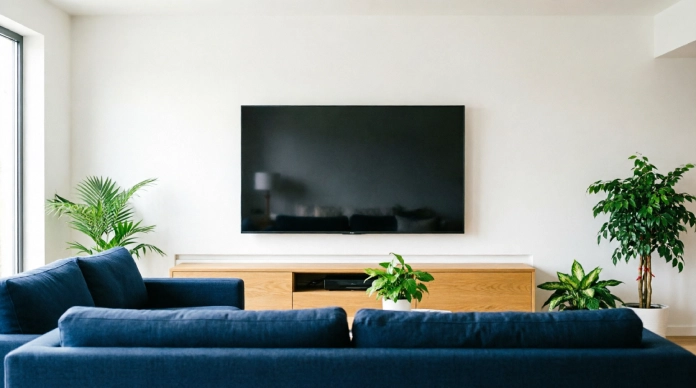
3. Hide TV Cords Behind a Wall Mounted TV
Dangling cables under a mounted television are one of the eyesores in a living room. An in wall cable management kit can route everything through the wall itself though its worth checking electrical codes before cutting into drywall.
- A surface mounted raceway is the no-cutting alternative
- Keep power cords and signal cables organized separately to avoid interference
- Great for streamlining an entertainment wall
4. Create a Stylish Cord Box for Power Strips
A cord box is a container that hides your power strip and the mess of plugs feeding into it.
- Place it under a desk, TV console or media cabinet
- Look for boxes with ventilation slots so cords don’t overheat
- Instantly makes any charging corner look tidier
5. Use Cable Clips to Keep Small Cords in Place
Cable clips are cheap, small and incredibly useful for everyday cord management.
- Stick them behind desks, nightstands or entertainment consoles
- Prevent charging cables from slipping behind furniture
- Group cords by function like charging cables in one row and speaker wires in another
6. Bundle Multiple Wires With a Cable Sleeve
A cable sleeve is a fabric or neoprene tube that wraps around cords turning a chaotic bundle into one neat strand.
- Ideal for computer setups, monitors, gaming consoles and TVs
- Flexible sleeves work best where cables need to move
- Unlike cable ties a sleeve keeps things bundled while staying easy to adjust
7. Hide Cords Inside or Behind Furniture
Your furniture is one of the natural hiding spots for wires. Your furniture is one of the natural hiding spots for wires.
If you’re setting up a workspace, smart furniture placement can also make the entire area feel more organized. Check out our Home Office Ideas for more ways to create a functional, clutter-free workspace.
- Route cables behind bookcases TV consoles, cabinets and desks
- Add clips underneath shelves or tabletops to keep cords from hanging
- Leave a slack so cables stay accessible for maintenance
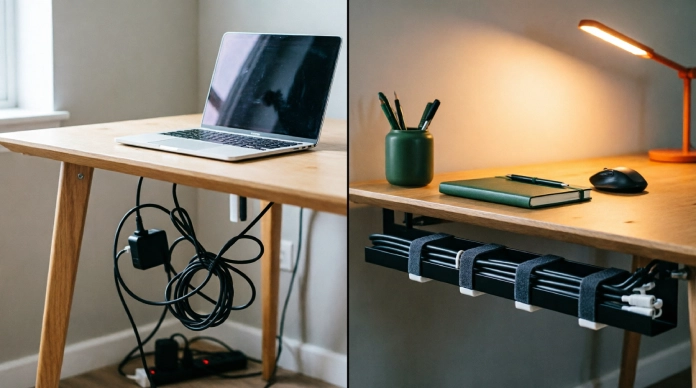
8. Try Under-Desk Cable Management
Home offices tend to collect the tangled cords so this deserves its own system. Home offices tend to collect tangled cords, so this deserves its own system.
If you’ve created a workspace inside your bedroom, these Bedroom Office Combo Ideas can help you keep both your desk and sleeping area organized.
- Install an under-desk cable tray to hold wiring
- Attach the power strip directly underneath the desk
- Use Velcro straps to bundle cable length
- Keep used charging cables within easy reach
9. Turn a Drawer Into a Hidden Charging Station
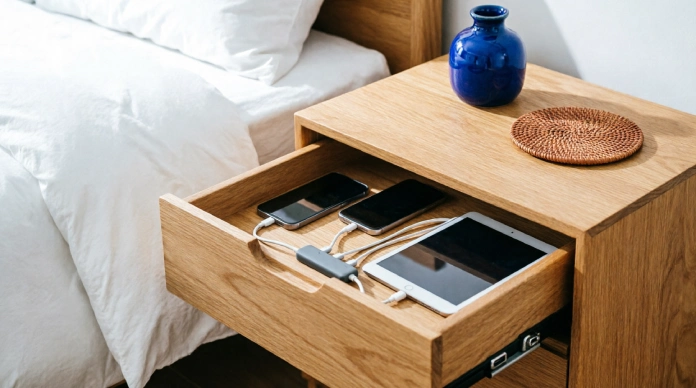
A drawer can double as a discreet charging station for phones, tablets and small devices.
- Feed cables through an opening drilled in the back of the drawer
- Add dividers to stop cords from tangling together
- Works especially well in bedrooms, kitchens and entryways
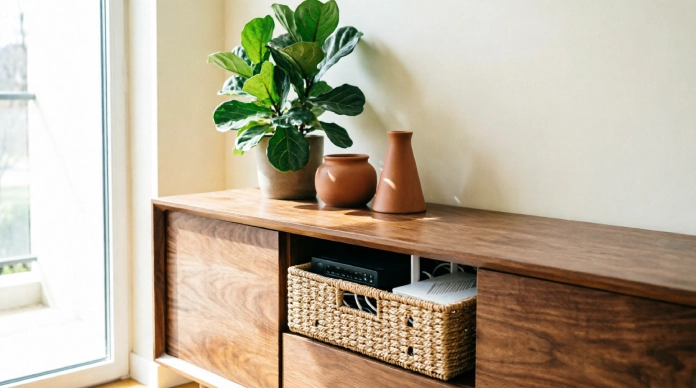
10. Use a Decorative Basket for Router and Modem Cords
Routers and modems come with a nest of cords that’re hard to disguise. A decorative basket solves this instantly.
- Pick a weave or ventilated basket so equipment doesn’t overheat
- Keep the routers lights and buttons accessible
- Match the baskets material to your existing room decor
11. Hide Floor Cords With a Floor Cord Cover
Cords running across the floor aren’t just unsightly they’re a real trip hazard.
- Use a floor cable cover to reduce that risk
- Great for setups, lamps and projectors
- Secure the cover flat against the floor to avoid a raised edge
12. Route Lamp Cords Along the Back of Furniture
Lamp cords are easy to make almost invisible with a planning.
- Run the cord behind a nightstand, sofa table or console
- Secure it with clips along the way
- Position furniture strategically so the cord never has to cross space
13. Conceal Cords Behind a Decorative Wall Feature
Wall panels, slat walls or beadboard aren’t just trendy they’re also excellent at hiding cables.
- Works well behind and around TVs
- Renters can use removable or surface mounted versions
- Combines home decor with cable management
14. Organize Cords Inside a Media Console
Gaming consoles streaming devices and speakers all come with their cords and a media console is the perfect place to contain them.
- Use cable ties, labels, clips and sleeves to stay organized
- Leave slack so devices can still be moved or unplugged
- Keep power cables separated from cables when possible
15. Use Velcro Straps of Letting Cables Tangle
Reusable Velcro straps are a small investment that makes a big difference.
- Bundle cables together for a cleaner look
- Avoid pulling straps tightly which can damage wiring
- Label cords you disconnect often so you’re not guessing later
16. Create a Dedicated Cable Management Station
Instead of scattering cords across the house centralize them in one spot.
- Use labeled bins or small containers. Use labeled bins or small containers. For more ways to keep chargers, accessories and everyday essentials under control, see our Home Office Organization Ideas.
- Separate phone chargers, laptop chargers, USB cables, HDMI cables and extension cords
- Fewer loose cables floating around instantly makes the whole home feel more organized
17. Hide Cords by Switching to Wireless Devices
Sometimes the easiest cord to hide is the one you don’t need anymore.
- Consider keyboards, mice, speakers and smart home devices
- You don’t need to replace everything at just start where it makes sense
- A gradual shift to wireless can meaningfully cut down on cable clutter
Smart Cord Management Tips for a Cleaner Home
- Group cables by device. Keep TV cables together computer cables together. Separate charging cables from permanent connections.
- Label both ends. This is especially helpful for entertainment systems and home office setups.
- Avoid cable length. Coil extra cable neatly of letting it loop across the floor.
- Keep used cords accessible. Hidden doesn’t have to mean to reach.
- Don’t overload outlets. Good organization should never come at the cost of safety.
How to Hide Cords and Wires in Rooms
Living Room
TV cables, gaming console wires, lamp cords and speaker cables all tend to pile up here. Raceways and media console organization work well.
Bedroom
Phone chargers, bedside lamp cords and TV cables are the suspects. A charging drawer or clips behind the nightstand keep things tidy.
Home Office
Monitor cables, laptop chargers, keyboard and mouse cords and power strips create the tangle in most homes. An under-desk tray solves most of it.
Kitchen
Small appliance cords, charging cables and coffee station wires can clutter a countertop fast. A cord box or decorative basket hides them easily. Small appliance cords, charging cables and coffee station wires can clutter a countertop fast.
A cord box or decorative basket hides them easily. For more practical ways to improve the layout and functionality of your kitchen, explore our guide to Transform Your Kitchen Space.
Entryway
Charging stations, smart home devices and lamps benefit from a cable management station, near the entrance.
Common Cord-Hiding Mistakes to Avoid
- Don’t tightly. Pinch cables when tucking them away
- Don’t hide a damaged or frayed electrical cord, repair or replace it instead
- Don’t bury cords where heat can build up
- Don’t overload power strips just to reduce clutter
- Don’t permanently seal in cables you might need to replace later
- Avoid creating trip hazards while trying to hide wires
- Skip adhesives that could damage painted walls
- Keep your setup practical, not pretty
Before hiding any electrical cord, make sure it isn’t damaged, frayed or overloaded. For more information, review these electrical cord safety guidelines .
How to Choose the Best Cord-Hiding Method
| Problem | Best Solution |
|---|---|
| TV cord hanging down the wall | Cable raceway |
| Too many desk wires | Under-desk cable tray |
| Tangled chargers | Cable clips and Velcro straps |
| Power strip mess | Cord box |
| Floor cable running across a room | Floor cord cover |
| Router and modem wires | Decorative basket |
| Several computer wires bundled together | Cable sleeve |
| Charging clutter on a nightstand or counter | Charging drawer |
FAQs About Hiding Cords and Wires
1. What is the easiest way to hide cords and wires?
For people a mix of cable clips a cable sleeve and a simple raceway solves 80 percent of the issue without any tools or big setup efforts.
2. How can I hide TV cords without cutting into the wall?
A paintable surface mounted cord cover or raceway does the trick without any drilling or cutting. It can be taken off completely if you move.
3. How do I hide cords on the floor?
A floor cord cover is the choice because it helps prevent trips while keeping the cable safe. Putting the cord behind furniture is also a second option.
4. How can I hide cords in a home office?
An under-desk tray, a cable sleeve, for your monitor and computer cords and a few Velcro straps will make most desk setups look much better quickly.
5. How do you hide cords without damaging walls?
Use clips that are made for walls, removable raceways and command style hooks. These hold cords tightly without leaving any marks behind.
Conclusion
Cord clutter does not require a renovation to fix. A few raceways, cable sleeves, clips, cord boxes, baskets and under-desk organizers can turn a room into a calm and organized space in just a few hours.
Start with the area that bothers you the most, whether that is the TV wall, your desk or that messy charging drawer and expand from there. Once you know how to hide cords and wires the way keeping every room looking clean becomes easy.